Keep your screen professional.
Enjoy your music without the distractions. YouTube Music SFW Mode is a lightweight, elegant Chrome extension designed to keep your workspace clean and professional.
Enjoy your music without the distractions. YouTube Music SFW Mode is a lightweight, elegant Chrome extension designed to keep your workspace clean and professional.
Everything you need to listen in peace, right in your browser.
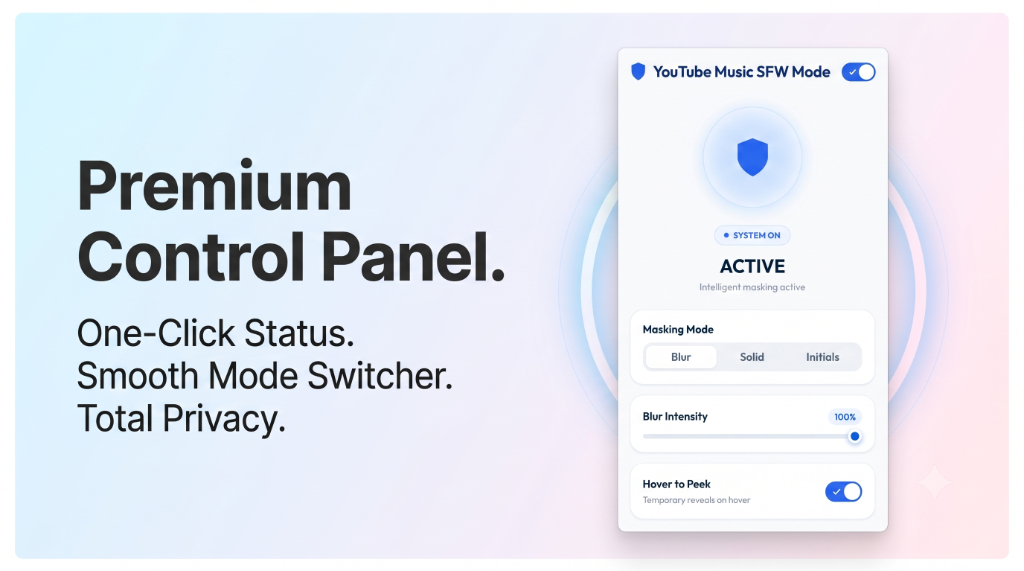
Customize how artwork is hidden with three distinct styles: Blur Mode softly blurs the artwork to keep ambient colors, Solid Mode blocks the image with a matched color scheme, and Initials Mode replaces covers with song or artist initials.
Want to see the album cover for a split second? Simply hover your mouse over any masked image to temporarily reveal the original artwork. The moment you move your mouse away, it’s instantly hidden again.
Take full control of your privacy. Use the slider in the control panel to choose anything from a light, semi-transparent blur to a completely opaque mask.
Toggle SFW Protection mode instantly using Alt + Shift + B. No need to click around when a coworker or boss approaches your desk.
YouTube Music SFW Mode integrates seamlessly into your browsing experience. It functions quietly in the background without modifying any music audio.
We believe privacy is a fundamental right. That is why all processing happens locally on your machine.
We do not collect, store, track, or share your browsing history, web activity, or personal information.
All style modifications and preference saving occur entirely within your local browser's storage.
Optimized code ensures zero performance impact, zero tracking scripts, and minimal permission requirements.
Designed exclusively to hide and mask album art to create a professional listening environment.
Have questions about YouTube Music SFW Mode? We have answers.
Install the SFW Mode extension, open YouTube Music, and click the extension icon in your browser toolbar to customize your preferred masking mode. You can choose from Blur Mode (soft blur), Solid Mode (clean solid color matched to the song), or Initials Mode (minimalist color block showing song/artist initials).
Yes. Use Alt + Shift + B anytime to instantly toggle protection on or off. This is designed as an "emergency shortcut" — perfect for when a colleague or supervisor approaches your desk. A discreet status badge shows your protection settings at a glance.
Yes. The Hover-to-Peek feature lets you temporarily reveal the original artwork by hovering your mouse pointer over any masked thumbnail. The artwork is masked again the moment you move your mouse away — perfect for when you actually want to see what's playing.
No. The extension has zero data collection — it does not collect, store, or transmit your browsing history, personal data, or YouTube Music activity. All modifications and styling happen entirely on your local device.
No. This extension works only on the YouTube Music web player (music.youtube.com) in desktop browsers. It does not affect the native Android or iOS app because browser extensions cannot run inside mobile applications. However, you can use it on a laptop or tablet browser with the desktop site view.